Cryptography Explained - Managing Public and Private Keys Across Devices
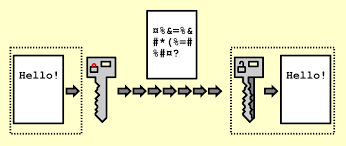
Understanding modern cryptography and keeping your keys secure across multiple devices.
Introduction
Cryptography is the foundation of modern digital security. Every time you browse a secure website, send an encrypted message, access a cryptocurrency wallet, or authenticate with an SSH server, cryptographic keys are working behind the scenes to protect your data.
As more people own multiple devices—laptops, desktops, smartphones, tablets, and cloud servers—managing cryptographic keys securely has become increasingly important. Poor key management can expose sensitive information, while good practices can make your digital life both secure and convenient.
This guide explains how public and private keys work and provides practical strategies for managing them across multiple devices.
Understanding Public-Key Cryptography
Modern encryption often relies on asymmetric cryptography, which uses a pair of mathematically related keys:
- Public Key
- Can be shared with anyone.
- Used to encrypt data or verify digital signatures.
- Does not need to remain secret.
- Private Key
- Must remain confidential.
- Used to decrypt data or create digital signatures.
- Whoever possesses the private key effectively owns the associated identity.
The relationship looks like this:
1
2
3
4
5
6
7
8
9
          Generate Key Pair
                │
      ┌─────────┴─────────┐
      │                   │
 Public Key          Private Key
(Share Freely)      (Keep Secret)
      │                   │
Encrypt Data        Decrypt Data
Verify Signature    Create Signature
Real-World Examples
Public/private key pairs are used in many technologies:
| Technology | Public Key | Private Key |
|---|---|---|
| SSH | Stored on servers | Stored on your computer |
| HTTPS/TLS | Website certificate | Web server |
| PGP/GPG | Shared with contacts | Stored securely by owner |
| Cryptocurrencies | Wallet address derived from public key | Controls your funds |
| Passwordless Authentication | Stored by service | Stored on device |
Key Storage and Management Across Devices
Generating strong cryptographic keys is only half of the equation. Equally important is deciding where those keys should live, how applications access them, and how to synchronize them securely across devices.
Different environments require different storage strategies. What works for a local development machine is often inappropriate for a production server or a mobile device.
Key Storage Options
1. Environment Variables
Environment variables are commonly used to provide applications with secrets at runtime.
Example:
1
2
3
export PRIVATE_KEY="-----BEGIN PRIVATE KEY-----
...
-----END PRIVATE KEY-----"
Or, more commonly, reference the location of the key:
1
export PRIVATE_KEY_PATH="$HOME/.keys/id_ed25519"
Applications can then read the variable:
1
2
3
import os

key = os.getenv("PRIVATE_KEY")
Advantages
- Easy to integrate with applications.
- Supported by most programming languages.
- Works well in containers and CI/CD pipelines.
- Avoids hardcoding secrets into source code.
Disadvantages
- Environment variables may be visible to child processes.
- They can accidentally appear in logs or debugging output.
- On some operating systems, privileged users may be able to inspect another process’s environment.
- Large PEM-formatted keys can be cumbersome to manage as environment variables.
Best Practice
Instead of storing the entire private key in an environment variable, store a reference to the key:
1
PRIVATE_KEY_PATH=/home/user/.keys/id_ed25519
This keeps sensitive key material on disk with appropriate file permissions while still allowing applications to locate it.
2. Files on Disk
The most common storage method is keeping keys in protected files.
Example:
1
2
3
~/.ssh/id_ed25519
~/.gnupg/private-keys-v1.d/
~/.keys/api-signing.pem
Advantages
- Supported by virtually every cryptographic tool.
- Easy to back up.
- Easy to rotate.
- Supports encrypted key formats.
Best Practices
- Restrict permissions:
1
chmod 600 ~/.ssh/id_ed25519
- Store keys outside your project directory.
- Never commit key files to Git.
- Encrypt the key with a passphrase whenever possible.
3. Operating System Key Stores
Modern operating systems provide secure credential storage.
| Operating System | Secure Storage |
|---|---|
| Windows | Credential Manager / DPAPI |
| macOS | Keychain |
| Linux | GNOME Keyring / KWallet / Secret Service |
Applications can retrieve keys without exposing them in configuration files.
Advantages
- Integrated with the operating system.
- Encryption handled automatically.
- Often protected by your login credentials or biometric authentication.
Best Use Cases
- Desktop applications.
- Password managers.
- Authentication tokens.
- API credentials.
4. Hardware Security Modules (HSMs) and Security Keys
Rather than storing private keys in software, dedicated hardware can perform cryptographic operations without exposing the private key.
Examples include:
- YubiKey
- Nitrokey
- TPM (Trusted Platform Module)
- Hardware Security Modules (HSMs)
Advantages
- Private keys never leave the hardware.
- Excellent protection against malware.
- Ideal for high-value identities and signing operations.
5. Secret Management Services
In cloud-native environments, dedicated secret management solutions are often preferred.
Popular options include:
- HashiCorp Vault
- AWS Secrets Manager
- Azure Key Vault
- Google Secret Manager
These systems provide:
- Access control
- Audit logging
- Automatic rotation
- Encryption at rest
- Versioning
Applications authenticate to the secret manager and retrieve keys only when needed.
Why Key Management Matters
Generating a key pair is easy.
Managing it securely over time is the difficult part.
Common challenges include:
- Owning multiple computers
- Replacing old devices
- Device theft
- Hard drive failure
- Cloud synchronization
- Secure backups
- Preventing unauthorized access
Without proper planning, losing a private key may mean permanently losing access to encrypted data or digital assets.
Common Approaches to Managing Keys
1. Separate Keys Per Device
The simplest approach is generating a unique key pair on every device.
1
2
3
4
5
6
7
8
9
10
Laptop
├── SSH Key A
├── PGP Key A

Desktop
├── SSH Key B
├── PGP Key B

Phone
├── Authentication Key C
Advantages
- One compromised device doesn’t expose every key.
- Easier to revoke a compromised device.
- Better isolation.
Disadvantages
- More keys to manage.
- Servers and services must trust multiple public keys.
This is the recommended approach for SSH access.
2. Sharing the Same Private Key
Some users copy the same private key to every device.
1
2
3
4
5
Cloud Storage
        │
 ┌──────┼───────┐
 │      │       │
Laptop Desktop Phone
Advantages
- Convenient
- Same identity everywhere
Disadvantages
- Every copied device increases risk.
- A compromise of one device compromises all.
- Difficult to know where copies exist.
This approach is generally discouraged unless strong protections are in place.
3. Hardware Security Keys
A hardware security key stores private keys inside dedicated hardware.
Examples include:
- YubiKey
- Nitrokey
- SoloKey
Instead of copying private keys between devices:
1
2
3
4
5
Laptop
    │
USB/NFC Security Key
    │
Desktop
The private key never leaves the hardware.
Benefits
- Excellent security
- Resistant to malware
- Easy multi-device usage
- Supports modern authentication standards
Synchronizing Keys Securely
Sometimes synchronization is unavoidable.
Safe synchronization methods include:
Password Managers
Some password managers support encrypted storage of:
- SSH keys
- PGP keys
- Certificates
- Recovery keys
Examples include:
- Bitwarden
- 1Password
- KeePassXC (manual sync)
The vault itself should be protected with:
- A strong master password
- Multi-factor authentication
End-to-End Encrypted Storage
If cloud synchronization is necessary:
1
2
3
4
5
6
7
Local Device
      │
Encrypted Vault
      │
Cloud Storage
      │
Other Devices
The encryption should happen before data leaves your device.
Never upload unencrypted private keys.
Secure Offline Backups
Always maintain offline backups.
Good options include:
- Encrypted external SSD
- Encrypted USB drive
- Printed recovery codes (where appropriate)
- Fireproof safe
Follow the 3-2-1 backup rule:
- 3 copies
- 2 different storage media
- 1 copy stored off-site
Protecting Private Keys
Private keys should always be protected by multiple layers of security.
Encrypt the Key
Most key formats support encryption with a passphrase.
For example:
1
ssh-keygen -t ed25519 -a 100
This encrypts the private key using a passphrase.
Even if someone steals the file, they still need the passphrase.
Use Strong Passphrases
Avoid:
- birthdays
- names
- dictionary words
Instead, use:
1
correct horse battery staple ocean orbit camera maple
Long passphrases are generally stronger and easier to remember than short, complex passwords.
Enable Full Disk Encryption
Protect the entire device using built-in encryption:
- BitLocker (Windows)
- FileVault (macOS)
- LUKS (Linux)
If the device is stolen, encrypted storage helps prevent offline access to your private keys.
Device Lifecycle Management
When Buying a New Device
- Generate new keys if appropriate.
- Copy only what is necessary.
- Verify fingerprints after transfer.
- Remove temporary transfer files.
When Selling a Device
Before disposing of hardware:
- Delete private keys.
- Securely erase storage.
- Revoke old device keys if necessary.
- Factory reset the device.
When a Device Is Lost
Immediately:
- Assume the private keys may be compromised.
- Remove associated public keys from servers.
- Generate replacements.
- Update trusted devices.
- Rotate credentials where applicable.
Quick action minimizes potential damage.
Best Practices
Do
- Generate strong keys (Ed25519 is a popular modern choice for many applications).
- Encrypt private keys.
- Keep secure offline backups.
- Use hardware security keys when possible.
- Rotate keys if compromise is suspected.
- Limit where private keys are stored.
- Protect devices with full disk encryption.
- Use multi-factor authentication for related accounts.
Don’t
- Email private keys.
- Store unencrypted keys in cloud storage.
- Commit private keys to Git repositories.
- Share private keys with others.
- Reuse weak passphrases.
- Leave backup drives unencrypted.
Example Multi-Device Setup
A practical setup for a developer might look like this:
1
2
3
4
5
6
7
8
9
10
11
                    Offline Backup
                         │
                         │
               Encrypted External SSD
                         │
        ┌────────────────┼────────────────┐
        │                │                │
    Laptop           Desktop          Security Key
        │                │                │
    SSH Key A       SSH Key B      Authentication
    PGP Key A       PGP Key B      Passkeys
Each device has its own SSH key, while a hardware security key is used for authentication across services. An encrypted offline backup protects against data loss.
Final Thoughts
Cryptography is only as strong as the way its keys are managed. While the underlying mathematics provide robust protection, operational security—how keys are stored, backed up, synchronized, and rotated—is what determines their effectiveness in real-world use.
For most users, the safest strategy is to keep private keys encrypted, avoid unnecessary duplication, maintain secure backups, and use hardware security keys whenever practical. By treating your private keys as valuable digital assets, you can confidently use multiple devices without sacrificing security or convenience.
Ultimately, good key management is not about making access difficult—it’s about ensuring that only the right people, on the right devices, can access what matters most.
Get in Touch
Have suggestions, feedback, or specific topics you’d like us to cover? Don’t hesitate to reach out:
- 📧 Email: okelo2014@gmail.com
- 🐦 Twitter: @KnightLord_
- 📸 Instagram: i_am.shawn_
- 📱 WhatsApp: +254743198855
Thank you for stopping by, and let the learning adventure begin! 🚀
Appreciation:

Thank you for being a part of this journey. Keep the flame alive. Here’s to more learning and growth together!